
How to Use Color Psychology in Real Estate Videos: A 2026 Practical Guide
Today I want to talk about something that took me years to really understand: how color affects the way potential buyers respond to property videos.
I used to think “just make it bright and clean” was enough. But after comparing hundreds of my videos and their engagement data, I realized that the way colors are presented in your videos significantly impacts viewer response. This isn’t about manipulation—it’s about accurately showing what the property actually feels like.
Let me share what I’ve learned through trial and error, and hopefully save you from some of the mistakes I made.
Contents
- 1 I. Understanding Color in Property Videos
- 2 II. AI-Assisted Color Optimization and Space Enhancement Workflow
- 3 III. Using Light and Shadow to Create Depth
- 4 IV. From Listing URL to Video: Modern Automated Workflow
- 5 V. Common Mistakes and How to Fix Them
- 6 VI. Matching Color to Property Type
- 7 VII. Complete Checklist for Modern Workflow
- 8 VIII. Learning From Results
- 9 IX. Summary and Key Takeaways
I. Understanding Color in Property Videos
Why Color Matters More Than You Think
About three years ago, I posted two videos of the same condo—one using raw footage, another where I spent time adjusting the colors. Same property, same camera, just different post-processing. The raw footage video with flat colors and average lighting got about 200 views and generated 2 inquiries, while the color-adjusted version with balanced, bright, and warm tones pulled in 450 views and 8 inquiries.
This got my attention because the difference wasn’t the property itself—it was how the colors made people feel when they watched the video.
From “Shooting-Time Control” to “Post-Production Intelligence”
The Limitations of Traditional Methods:
Early on, I always tried to control color by choosing the “perfect” shooting time—waiting for ideal light, selecting specific times of day. But reality kept getting in the way: sellers’ schedules didn’t always cooperate, weather was unpredictable, and even when conditions were right, the best light of the day might only last 30 minutes. Reshooting when things didn’t work out was expensive and time-consuming.
The More Practical Approach Now:
I’ve found a more efficient workflow that involves shooting anytime and then optimizing with AI tools in post-production. This approach eliminates time constraints, which means I can quickly shoot multiple properties without waiting for perfect conditions. It also gives me much more flexibility to adjust things after the fact while maintaining a consistent visual style across all my listings.
The Shift Toward Warmer Tones
What I’ve Observed in 2026:
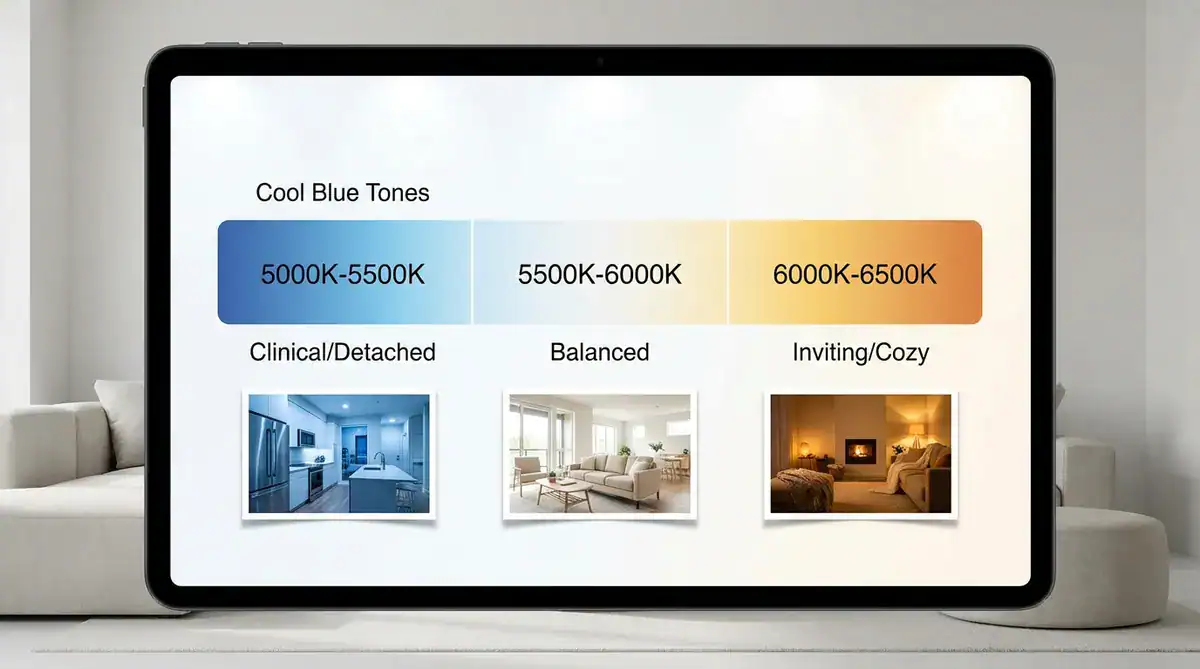
Buyer preferences seem to be moving away from the ultra-modern, stark white aesthetic that dominated 2020-2023. Now, people respond better to warmer, more natural tones—think earth colors like sand, clay, and soft beige.
The key isn’t to artificially create this atmosphere during shooting, but rather to better present the warmth that already exists in the property through post-processing.
Different Rooms Need Different Approaches
Here’s something I learned the hard way:
The Whole-House Processing Mistake
I used to apply one color setting to an entire property video. Big mistake. Each room serves a different purpose and should feel different.
Living Areas and Kitchens: Emphasize Warmth
Why? These are social spaces. Warmer tones (slightly golden) make people think about family dinners, hosting friends, cozy evenings.
What I do now:
- Shoot clear raw footage first (no need to wait for specific times)
- Use AI tools to process photos of these spaces with warm tones
- Extract color parameters from processed images
- Apply to video footage
- Maintain warmth without going overboard
The advantage of this method is you can adjust repeatedly until you find the best result, rather than relying on a “one-shot opportunity” during filming.
Bathrooms and Offices: Emphasize Clean and Bright
A bathroom should feel fresh and clean. An office should feel focused and clear.
Common Bathroom Issue:
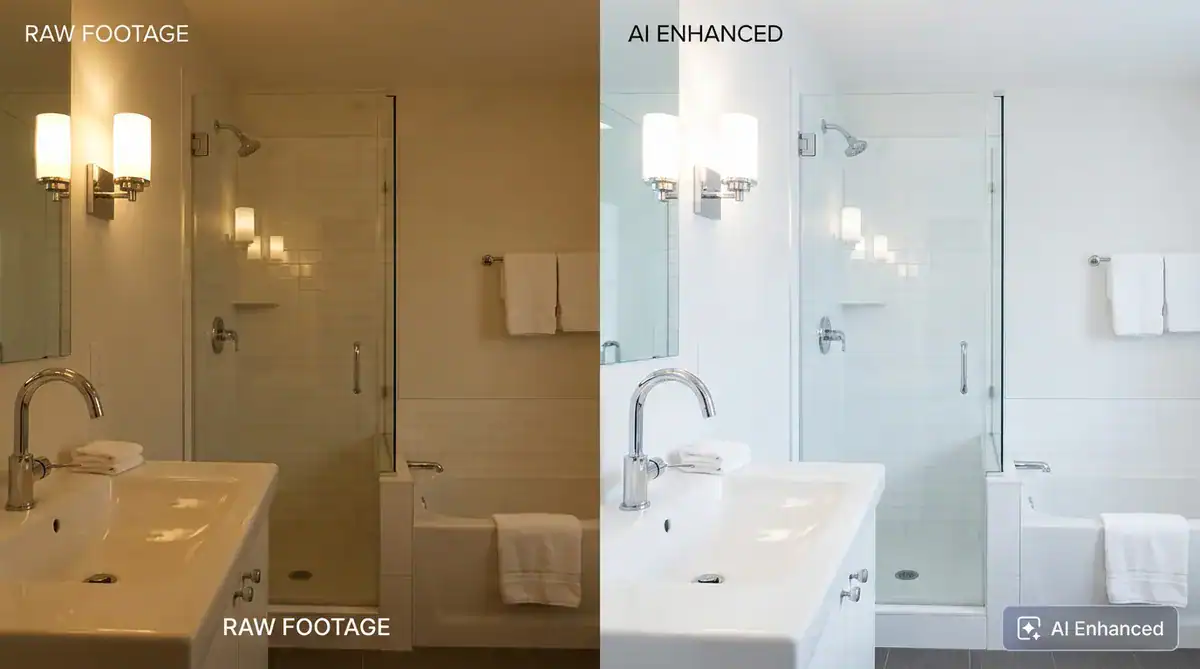
Many bathroom shots come out yellowish, making white fixtures look less clean. The traditional method is adjusting lighting during shooting, but that’s time-consuming.
More Efficient Approach:
- Shoot the bathroom normally (ensure basic exposure is correct)
- Use AI tools to process bathroom photos, adjusting to crisp cool-white tones
- Apply the processed color style to video
- Make sure whites actually look white
What works: Bathrooms benefit from slightly cooler, crisper tones through post-processing. Not cold and uninviting, but clean and bright.
II. AI-Assisted Color Optimization and Space Enhancement Workflow
From Photos to Videos: The New Method
How My Workflow Changed:
Over the past year, I’ve discovered a more efficient approach: optimize property photos with AI tools first, then use these enhanced photos to generate videos.
Why this works:
- Photo processing is faster, can quickly preview results
- AI tools are more mature at handling static images
- Can prepare unified style photos and videos for different platforms
- Process once, use everywhere
- Can even change space styling and furniture
AI Can Do More Than Just Color Adjustment
This is what I’ve recently discovered:
Modern AI tools have evolved way beyond simple color correction. On the color and lighting side, they can adjust temperature to make a room feel warmer or cooler, optimize exposure and brightness, balance contrast, and correct those annoying white balance issues that cameras sometimes create. But what really surprised me was the space transformation capabilities—you can actually change the style of a room, swap out furniture from traditional to modern, adjust wall colors, or add and remove decorative items.
Real Application Case:
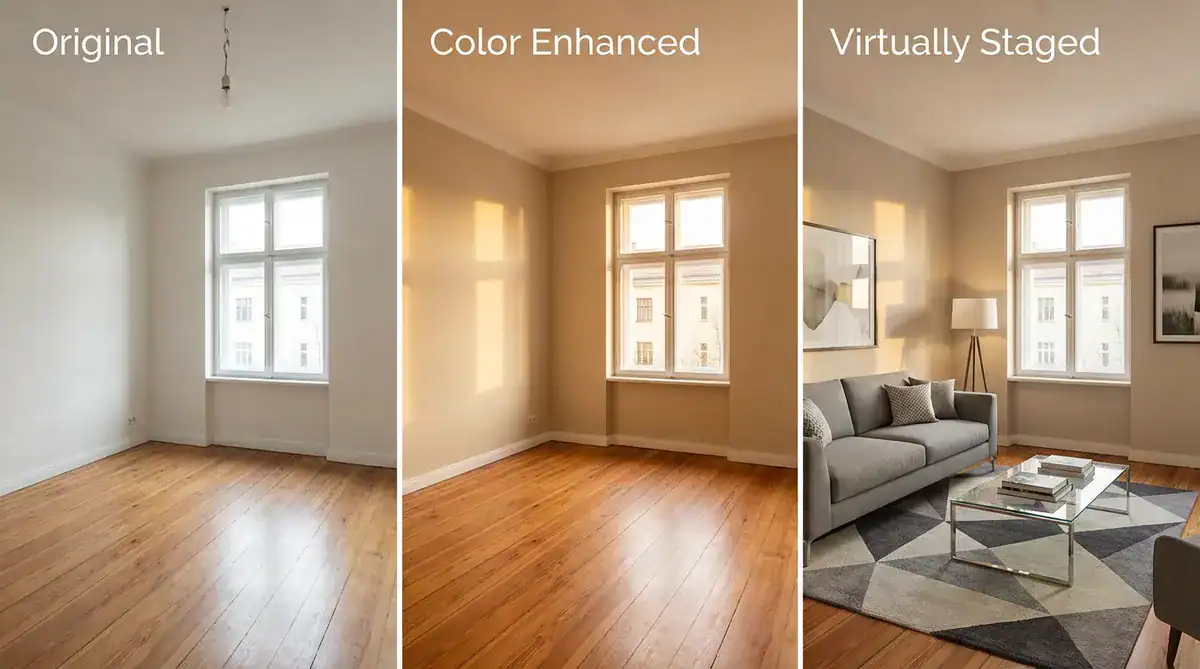
Last month I took on a completely vacant condo, and instead of going the traditional staging route (which would have cost $2,000-3,000 and required 2-3 days for setup and removal), I used AI tools to add modern minimalist furniture to the photos. The whole process took about 30 minutes and cost essentially nothing. I generated multiple style versions—modern, traditional, and minimalist—so potential buyers could choose their favorite style and really visualize the space’s potential.
Important Note: I always mention in the listing description that “some photos show virtual staging,” maintaining transparency. Buyers understand and appreciate seeing the “post-renovation potential.”
Actual Workflow Process
My standard workflow now:
- Shooting Phase: Take clear original photos (don’t worry too much about color or vacancy)
- AI Optimization Phase:
- Adjust colors and lighting
- Add virtual furniture to needed spaces
- Try different style options
3. Generate Video: Combine optimized photos into video
4. Final Confirmation: Check if it’s both realistic and attractive
Specific Example:
Last month I shot a condo with average lighting and some empty rooms:
- Original photos looked dull and empty
- AI processing: increased brightness, added warm tones, furnished living room and bedroom
- Generated a 90-second showcase video
- Buyer feedback: “Looks so homey, I can imagine living there”
Maintaining Authenticity Boundaries
Important Principles:
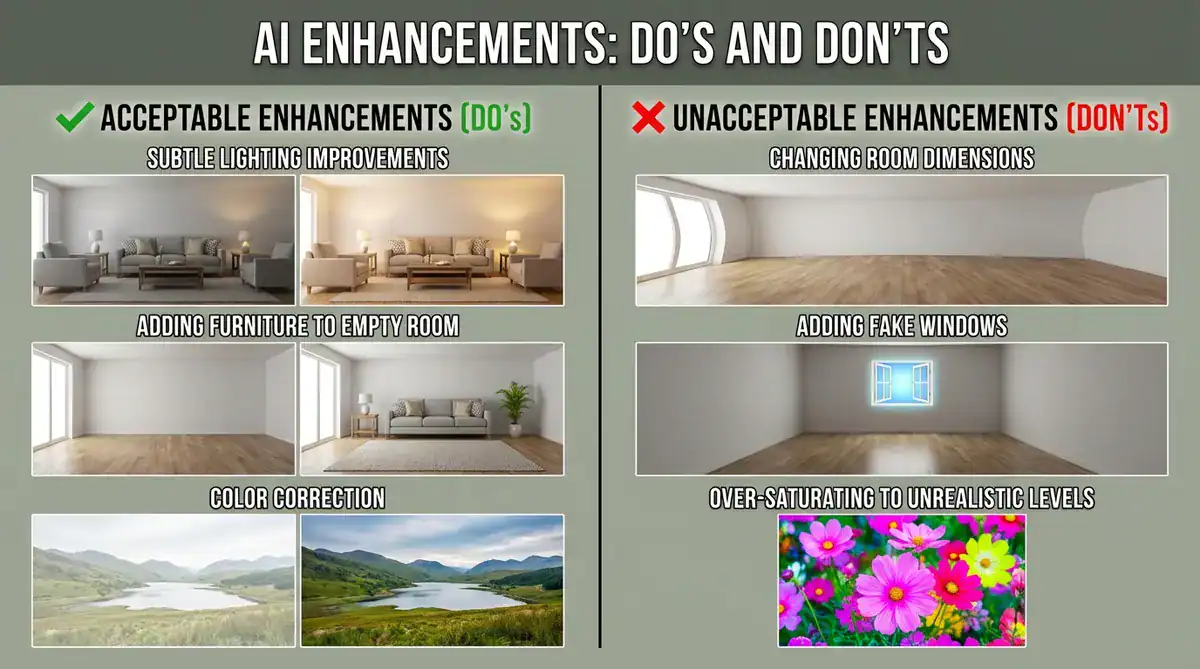
AI virtual staging is powerful, but it needs to be used responsibly. You can absolutely show a space’s renovation potential and help buyers imagine different living scenarios by providing multiple style references, but you need to be upfront about it—always clearly label “virtually staged” in your descriptions. What you shouldn’t do is hide structural issues, fabricate features that don’t exist like fireplaces or windows, exaggerate the dimensions of a space, or fail to inform buyers about what’s been virtually added or changed.
I always include a note in my video descriptions that says “some photos show virtual staging effects,” and I make sure to provide original empty room photos for comparison. During showings, I’m transparent about which elements were AI-assisted so there are no surprises.
Lesson from Last Spring:
I learned this the hard way when I over-enhanced a backyard lawn to the point where it looked like a golf course. Even though I mentioned “photos optimized” in the description, buyers were still disappointed when they saw it in person. My principle now is simple: enhance real strengths, but don’t create false expectations that will damage trust.
III. Using Light and Shadow to Create Depth
Why Flat Lighting Looks Cheap
Early in My Career:
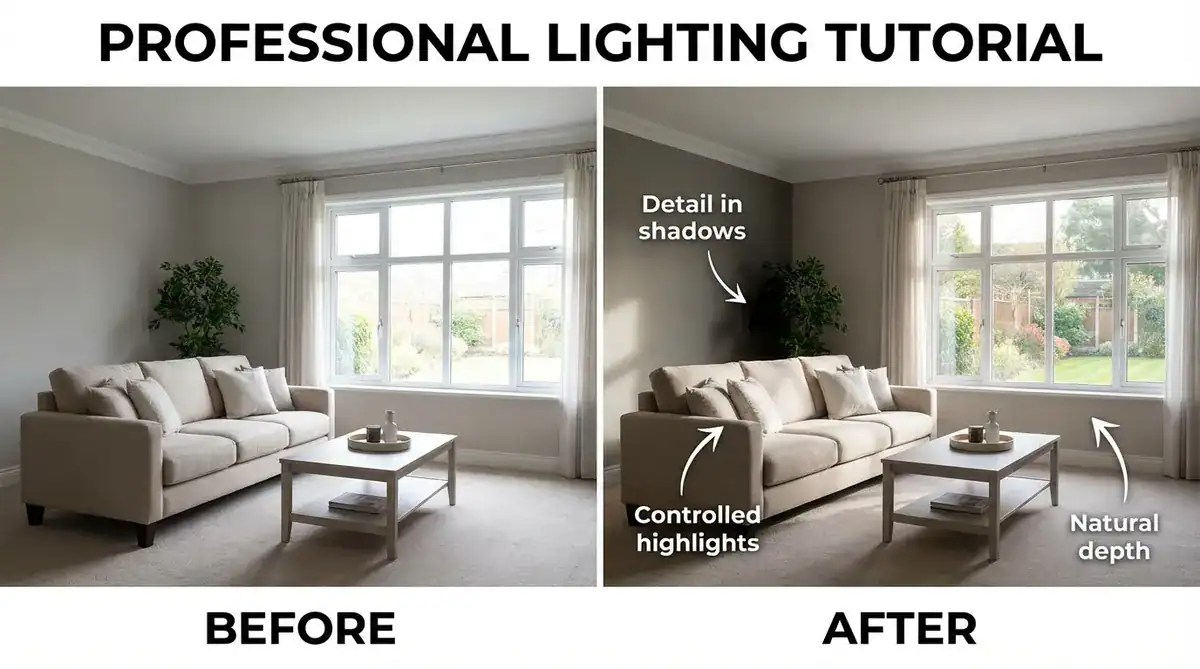
I thought more light was always better, so I’d turn on every light in the house, open every blind, and try to eliminate every shadow. The videos were fine, but they looked flat—more like an office building than a home. The turning point came when I toured a high-end listing that had been shot by a professional videographer, and the difference was striking. Their video had real dimension because the light and shadow worked together to show the space rather than fighting against it.
What I learned was that some shadows are actually good because they create depth, windows should be bright without being blown out to pure white, and even darker corners should still show texture and detail. The goal isn’t dramatic lighting—it’s natural contrast that makes the space feel real and three-dimensional.
Practical Application
My Current Approach:
- Expose for Highlights: Make sure windows aren’t pure white blobs
- Check Shadows: Can you still see detail in darker areas?
- Add Subtle Vignette: Very slight darkening at frame edges draws the eye to center
Important: Don’t overdo it. Subtle is key.
IV. From Listing URL to Video: Modern Automated Workflow
The Efficiency Revolution I Recently Discovered
The Problem with Traditional Methods:
Creating a listing video used to require:
- Download all photos from MLS
- Upload each one to editing software
- Manually add property information (address, price, square footage, etc.)
- Adjust photos one by one
- Manually arrange and add transitions
- Export and review
Total Time: 60-90 minutes
ListingHub‘s URL Parsing Feature
This Feature Changed How I Work:
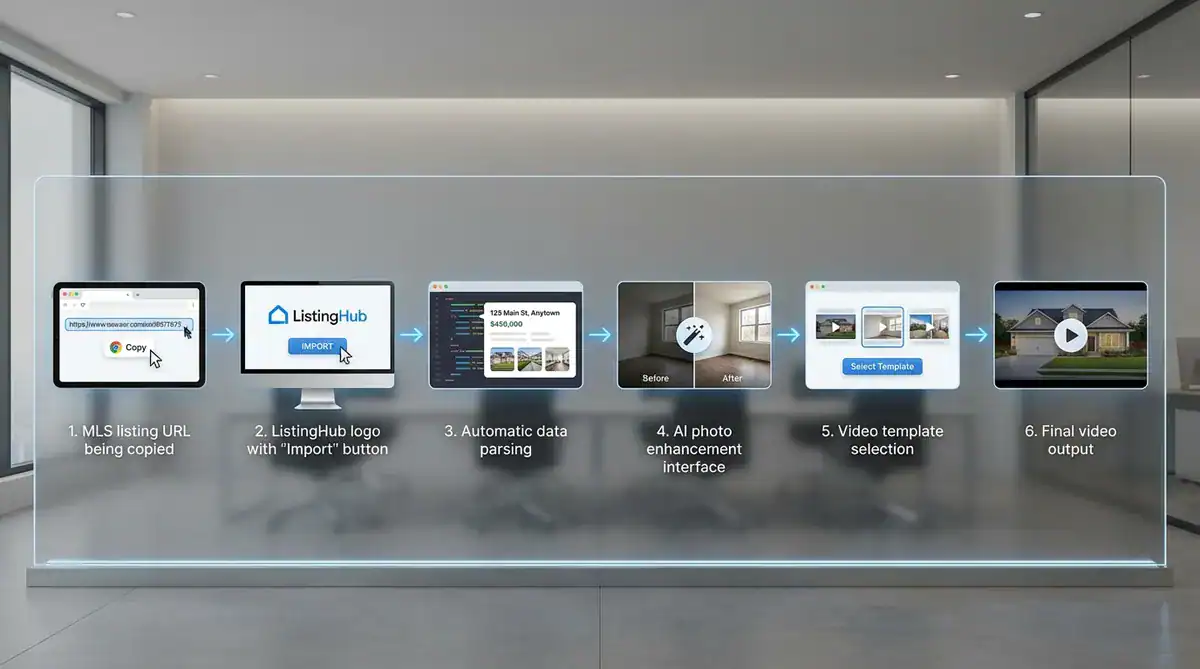
Now I use a particularly practical feature in ListingHub where I can generate videos directly from listing URLs. The workflow is straightforward: I copy the MLS or property website listing link, paste it into ListingHub‘s video creation tool, and click import. The platform automatically extracts the property address, price, bedroom and bathroom count, square footage, and all the listing photos—no more manual data entry.
The real magic happens in the AI photo optimization phase before the video is generated. I can use one-click auto-optimize that intelligently recognizes different room types, or manually fine-tune color temperature, brightness, and contrast. If I need virtual staging, I can add furniture to empty rooms, change existing décor styles, or adjust wall colors right in the same interface. For individual room customization, I typically apply warm tone presets to living rooms and kitchens, crisp white presets to bathrooms, and soft cozy presets to bedrooms.
Once the photos are optimized, I select a video template (Just Listed, Open House, Luxury, etc.), adjust the display order if needed, add transition effects and background music, and click generate. The whole process from pasting the URL to downloading the finished video takes about 15-20 minutes, including the photo optimization work.
Real Case Comparison
Case: Downtown 2-Bedroom Condo
Traditional Method (My Old Way):
- Download 15 MLS photos: 5 minutes
- Upload to editing software: 5 minutes
- Adjust colors one by one: 30 minutes
- Add text information: 10 minutes
- Arrange and add transitions: 15 minutes
- Export and review: 10 minutes
- Total: 75 minutes
ListingHub URL Method (Now):
- Copy-paste listing URL: 30 seconds
- System auto-import and parse: 1 minute
- AI batch optimize photos: 5 minutes
- Select template and adjust: 5 minutes
- Generate video: 3 minutes
- Review and download: 2 minutes
- Total: approximately 17 minutes
Time Saved: 58 minutes (77%)
Real Advantages of This Workflow
The time savings are obvious—no more manually downloading and uploading photos or typing in property information one by one—but what I really appreciate is how it reduces errors. When the system automatically extracts information, I don’t have to worry about typos in prices or addresses. Since the photos are already AI-optimized before video generation, the final video automatically maintains a consistent visual style across all the rooms, which is something I used to struggle with when doing everything manually.
The flexibility is another big win. If a seller says they want to change the living room furniture color or try a different style, I can adjust just those few photos and regenerate the video in minutes rather than starting from scratch. For the same property, I can quickly generate different versions—a 30-second clip for social media, a 90-second detailed showcase for the MLS, or multiple style variations showing furnished versus empty spaces.
Practical Usage Recommendations
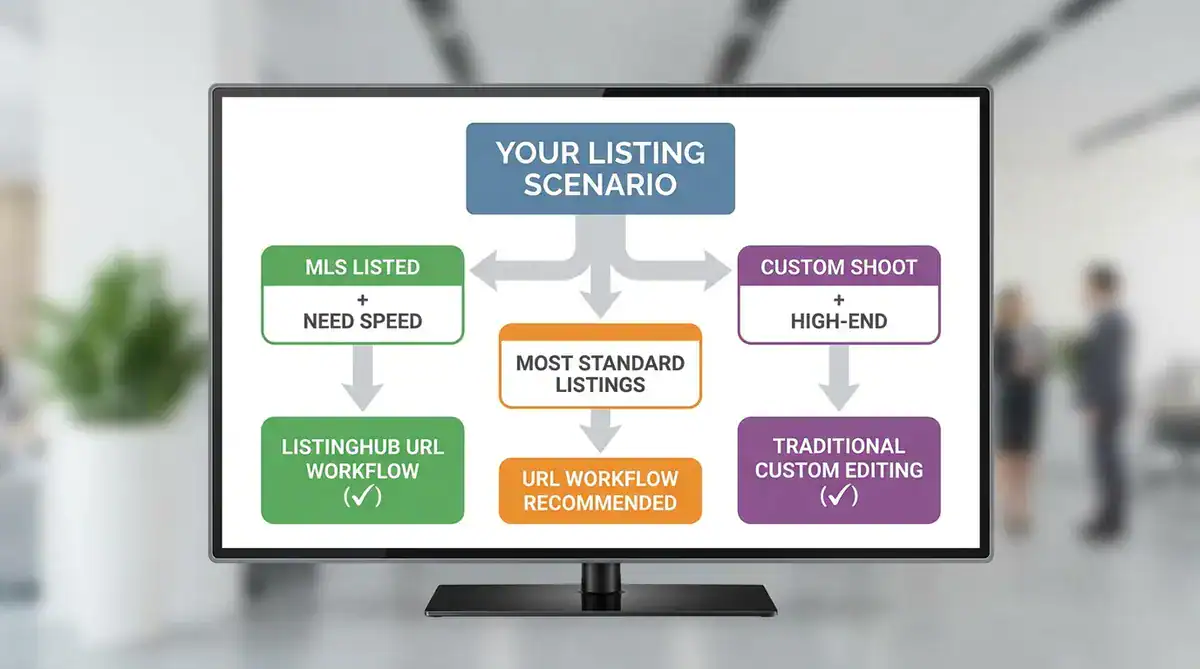
The URL workflow is ideal when you’re dealing with properties that already have MLS listings, need to produce videos quickly, have photos that are decent quality but could use some enhancement, or want to experiment with virtual staging. It’s not the best choice if you’re working with a brand new shoot that hasn’t been listed yet, need something highly customized and creative, or if the photos are so poor quality (extremely blurry or severe exposure issues) that even AI can’t save them.
In my actual practice, I use the ListingHub URL import feature for standard listing videos because it’s quick and efficient. For important luxury projects where the client expects something special, I might spend more time on custom shooting and editing. And for social media quick clips, I often just extract segments from videos I’ve already generated using the URL method. It’s not an “all AI or nothing” choice—it’s about flexibly using different tools based on what each specific project needs.
V. Common Mistakes and How to Fix Them
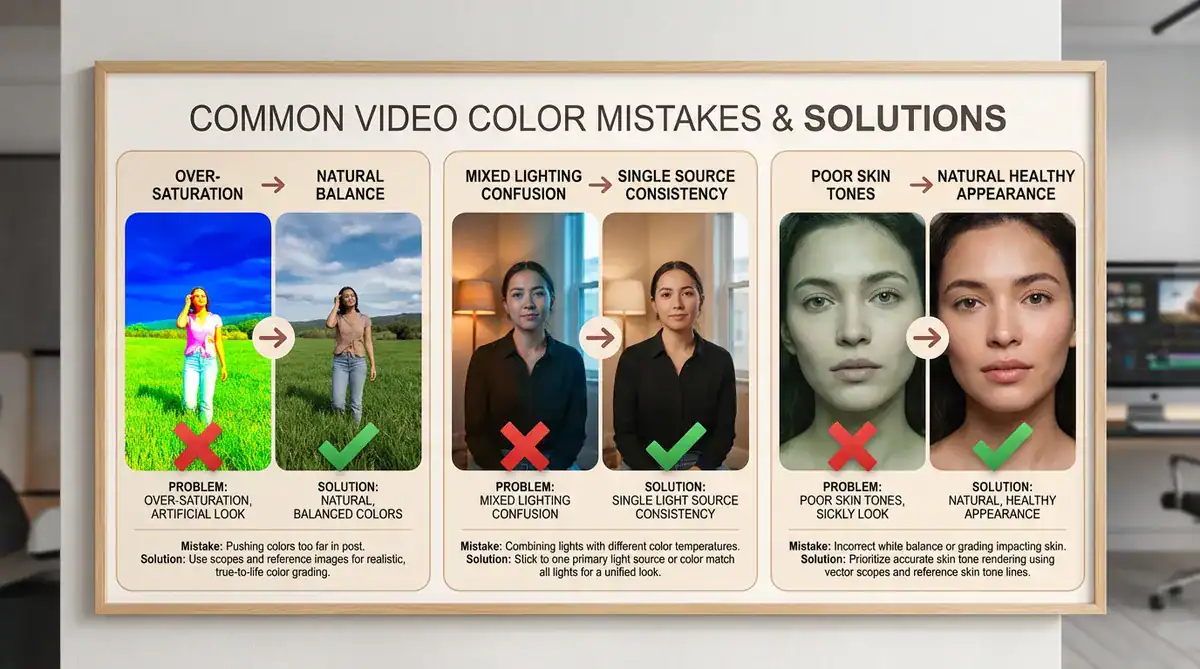
Mistake 1: The “Push All Sliders Up” Approach
Early on, I thought making everything more vibrant, brighter, and sharper would automatically make videos look better, so I’d max out saturation, crank up brightness, and boost every adjustment slider I could find. The result looked artificial and overdone. What actually works is making small, specific adjustments—if you’re boosting one element, you often need to reduce another to maintain balance. Less is usually more when it comes to color grading.
Mistake 2: Ignoring Mixed Lighting
This happens when you’re filming a room with daylight coming through windows (which is bluish) while interior lamps are turned on (which is yellowish). The camera gets confused, and the colors look weird. My solution now is simple: if natural light is strong, I turn off the interior lights; if I need interior lights, I close the blinds or curtains. Using one dominant light source keeps colors consistent, and trust me, it’s much easier to get it right while filming than trying to fix mixed lighting in post-production.
Mistake 3: Forgetting About Skin Tones
I made a video once where I walked through a property and adjusted the colors to make the house look modern and cool-toned. The house looked great, but I looked terrible—pale, unhealthy, almost grey. If you’re in your videos (and you should be because it builds trust), you need to make sure the color adjustments work for both the house and you. I always record a quick test clip of myself in the property now and check if my skin looks natural before committing to a color grade.
VI. Matching Color to Property Type
Not Every Property Should Look the Same
Context Matters:
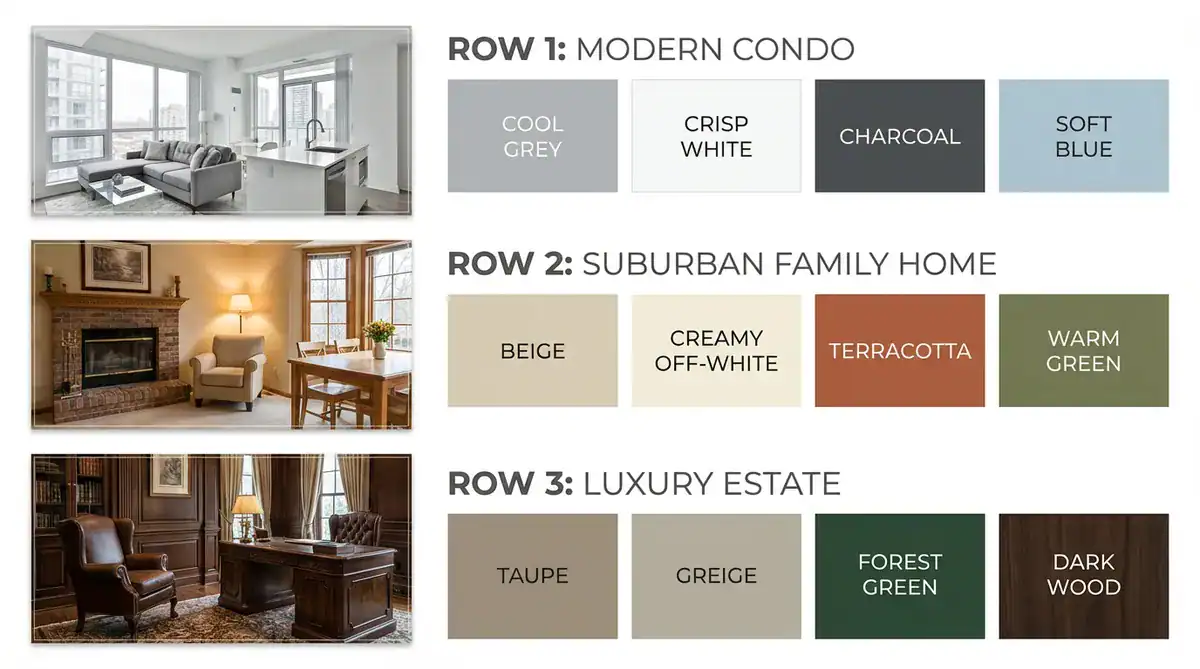
The color approach for a modern downtown condo should differ from a rustic mountain cabin.
Urban Modern Properties
Characteristics:
- Clean lines, contemporary design
- Often benefit from cooler, more neutral tones
- Emphasis on sleek and sophisticated
Color Approach:
- Keep whites crisp and true
- Allow for some cooler tones (but not cold)
- Focus on contrast and clarity
Traditional/Suburban Homes
Characteristics:
- Family-focused spaces
- Warm, welcoming atmosphere
- Comfort over minimalism
Color Approach:
- Warmer color temperature
- Softer, more inviting tones
- Emphasize the “homey” feeling
Luxury Properties
Characteristics:
- High-end finishes
- Attention to detail matters more
- Buyers are more discerning
Color Approach:
- Subtle adjustments
- Natural but refined
- Focus on accurately showing material quality
VII. Complete Checklist for Modern Workflow
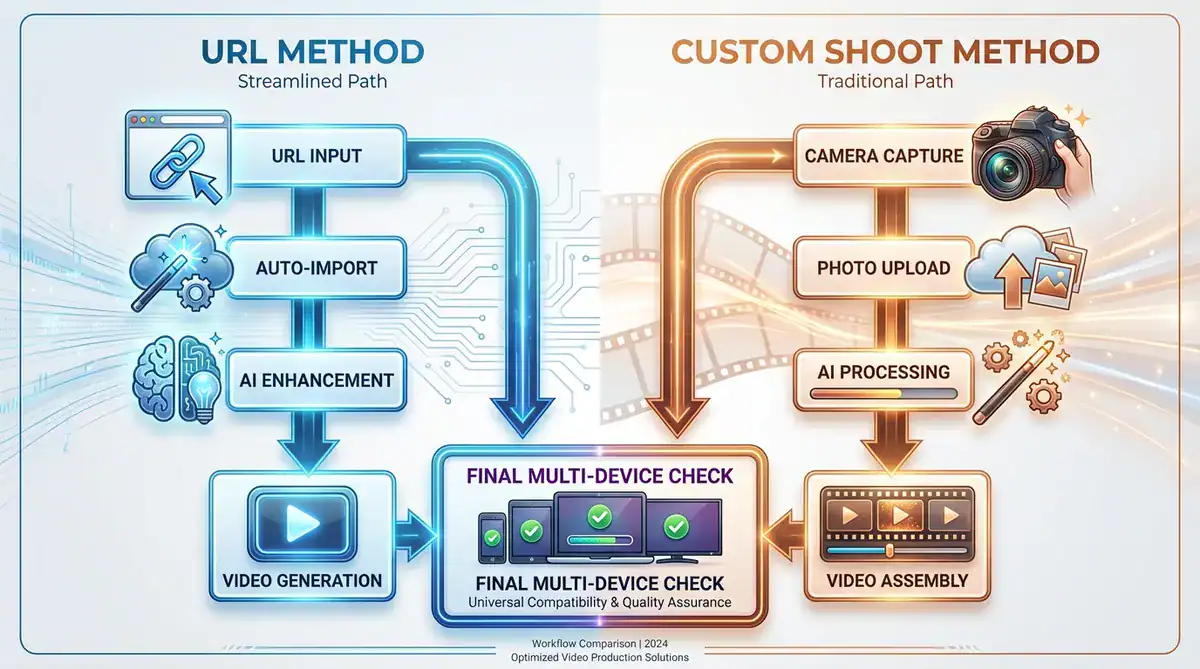
Method A: Quick Generation from Listing URL (Recommended for Existing Listings)
Preparation Phase:
☐ Confirm listing is live: MLS or property website has complete information
☐ Check photo quality: Original photos have acceptable clarity (AI can optimize but can’t work miracles)
☐ Copy listing URL: Complete listing link
ListingHub Import Phase:
☐ Paste URL to import: Let system automatically parse property info and photos
☐ Verify information accuracy: Check if auto-extracted price, square footage, etc. are correct
☐ Confirm photo completeness: All important rooms have photos
AI Photo Optimization Phase:
☐ Batch color optimization: Use smart presets to quickly process all photos
☐ Room-by-room fine-tuning:
- Living room/kitchen: Warm tone preset
- Bathroom: Crisp white preset
- Bedroom: Soft cozy preset
☐ Virtual staging (if needed): - Decide which empty rooms need furniture
- Choose appropriate décor style
- Note “some photos virtually staged” in listing description
☐ Save original photos: Always keep unprocessed versions for comparison
Video Generation Phase:
☐ Select template: Just Listed / Open House / Luxury, etc.
☐ Adjust photo order: Arrange in logical flow (entrance→living room→kitchen→bedroom→bathroom)
☐ Set transitions: Natural, smooth transition effects
☐ Add music: Choose background music matching property atmosphere
☐ Generate and preview: 2-3 minutes automatic completion
Method B: Traditional Shoot + AI Optimization (For New Shoots or Custom Projects)
Shooting Phase:
☐ Basic exposure correct: Image not too dark or overexposed
☐ Stable and clear: No blur or shake
☐ Multiple angles: Each room from several perspectives
☐ Don’t wait for perfect light: Shoot normally, AI will optimize later
Photo Processing Phase:
☐ Upload to AI tool: Batch import original photos
☐ Smart optimization: Use auto-optimize feature
☐ Manual fine-tuning: Adjust individual photos as needed
☐ Virtual staging: Add furniture or adjust style for needed spaces
Video Generation Phase:
☐ Import optimized photos: Into video creation tool
☐ Apply unified style: Ensure all photos have consistent tone
☐ Add property information: Address, price, and other text content
☐ Generate video: Auto-combine into complete video
Universal Final Check (Applies to Both Methods)
Pre-Publication Verification:
☐ Multi-device review: Check on computer, tablet, and phone
☐ Authenticity confirmation: Do colors and lighting look natural?
☐ Skin tone check: If you’re in the video, does your skin tone look natural?
☐ Information accuracy: Price, square footage, address, and other text correct
☐ Transparency statement: If using virtual staging, state it in description
☐ Appropriate duration: 30-60 seconds for social media, 60-90 seconds for detailed version
Post-Publication Tracking:
☐ Record method used: URL import vs traditional shoot
☐ Record processing time: For future workflow optimization
☐ Track performance: View counts, inquiry numbers
☐ Collect feedback: Buyers’ reactions to photos/videos
VIII. Learning From Results
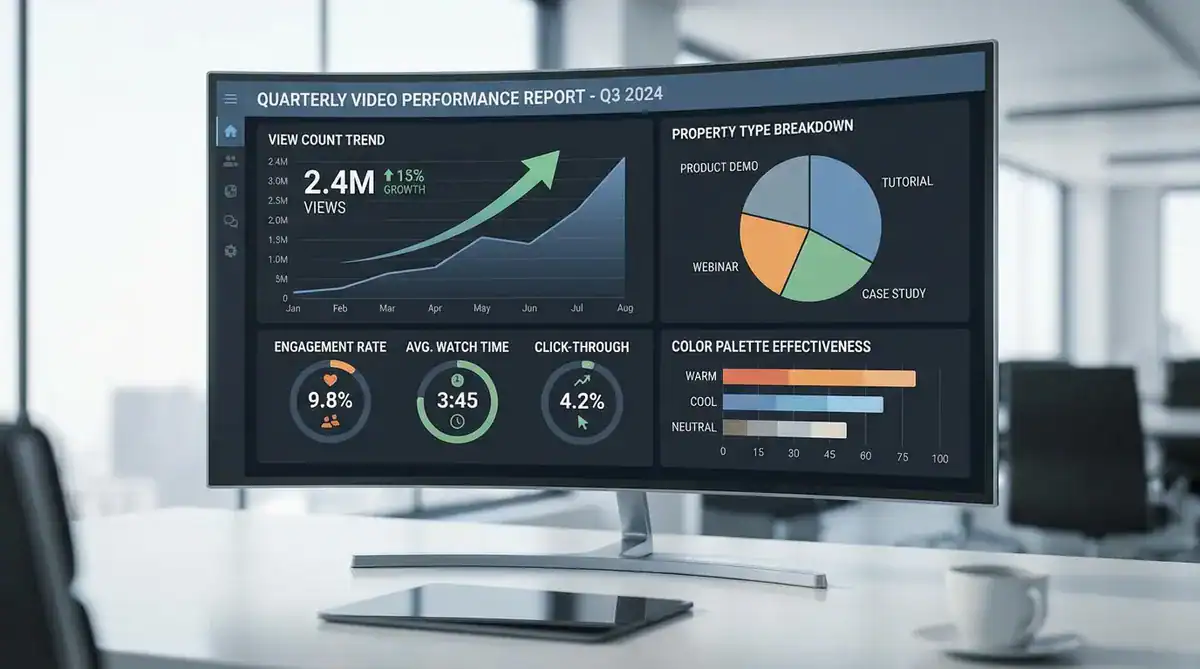
Track What Works
Something I Started Doing:
I keep a simple spreadsheet tracking my videos:
- Property type
- Color approach used
- View count after one week
- Inquiry count
What I’ve Learned:
- Warmer tones generally perform better for family homes
- Crisp, clean colors work better for condos and modern properties
- Authentic-looking videos get more engagement than heavily processed ones
Continuous Improvement
My Approach:
Every month, I review my top 3 and bottom 3 performing videos. I look at what they have in common:
- Lighting quality
- Color balance
- Overall feel
This data-driven approach has helped me understand my local market better than any general rule could.
Regional Differences
Worth Noting:
What works in Vancouver might differ from Phoenix or Seattle. Pay attention to:
- Your local aesthetic preferences
- Climate (sunny areas vs. overcast)
- Typical architecture and interior design
IX. Summary and Key Takeaways
Color and space presentation in real estate videos isn’t about creating illusions—it’s about efficiently and authentically showcasing a property’s best potential through modern AI tools. The workflow has evolved significantly: instead of waiting for perfect shooting conditions, we can now shoot anytime and optimize in post-production. Instead of being limited to simple color adjustments, we can now handle multi-dimensional processing including virtual staging and style transformations. And instead of manually handling every step, we can automate much of the process through URL import workflows that parse listing information and generate videos in a fraction of the time.
Choosing Your Approach
The URL quick method through platforms like ListingHub works great for existing MLS listings when you need fast turnaround on standard listing videos—you’re looking at 15-20 minutes total including AI optimization. The custom shoot method still makes sense for high-end luxury properties, special creative needs, or brand new projects where you want complete control. Most agents I know use both approaches depending on the situation rather than treating it as an either/or decision.
Core Principles Worth Remembering
AI is an enhancement tool that should be used responsibly—it can optimize colors, add virtual furniture, and adjust lighting, but it shouldn’t hide defects, exaggerate dimensions, or create false features. You need to be transparent about which portions are AI-processed in your descriptions. Virtual staging is genuinely valuable for helping buyers imagine space potential, especially in vacant properties, but maintaining transparency is non-negotiable.
The good news is that efficiency and quality can coexist, as the URL workflow demonstrates—15-20 minutes can produce professional-grade video if you’re using the right tools. Different rooms benefit from different processing approaches, and AI tools with preset templates make this surprisingly simple to execute. Always verify your final output on multiple devices because buyers primarily view content on mobile, and you want to ensure consistent results across all platforms.
Technology Evolves, But Core Remains
Tools are getting more powerful with AI optimization, virtual staging, and auto-generation capabilities, and workflows are getting more efficient with URL import and batch processing features. We have more possibilities now than ever—multiple styles, rapid iteration, quick adjustments. But what stays the same is that authenticity remains the foundation of trust, professional presentation leads to closings, efficiency determines market competitiveness, and buyer experience always comes first.
Final Advice
Don’t be intimidated by technology—modern AI tools are designed to lower barriers, not increase complexity. ListingHub‘s URL workflow is a perfect example: you don’t need to learn complex editing software, you don’t need professional photography skills, and you don’t need a design background. You just need a listing link, about 15 minutes, and basic aesthetic judgment. The rest, AI handles for you.
Most important: start trying. Pick a listing, paste the URL, click generate, and see what AI can do. You’ll find it’s simpler than you imagined with better results than expected. The market doesn’t wait, and your competitors might already be using these tools—but the good news is that these tools are now available to everyone, so the starting line is equal. The difference is who takes action first.
